
How to Add a Custom Crosshair in Marvel Rivals
Marvel Rivals is a third-person hero shooter, so your reticle sits in the middle of the screen and does most of the aiming work. The good news: the game ships with a real crosshair editor, so you can set the color, thickness, and gap without any extra software. This guide covers the built-in way first, then when a crosshair overlay is worth it, and what is safe to run. It is current for Marvel Rivals in 2026 (Season 8).
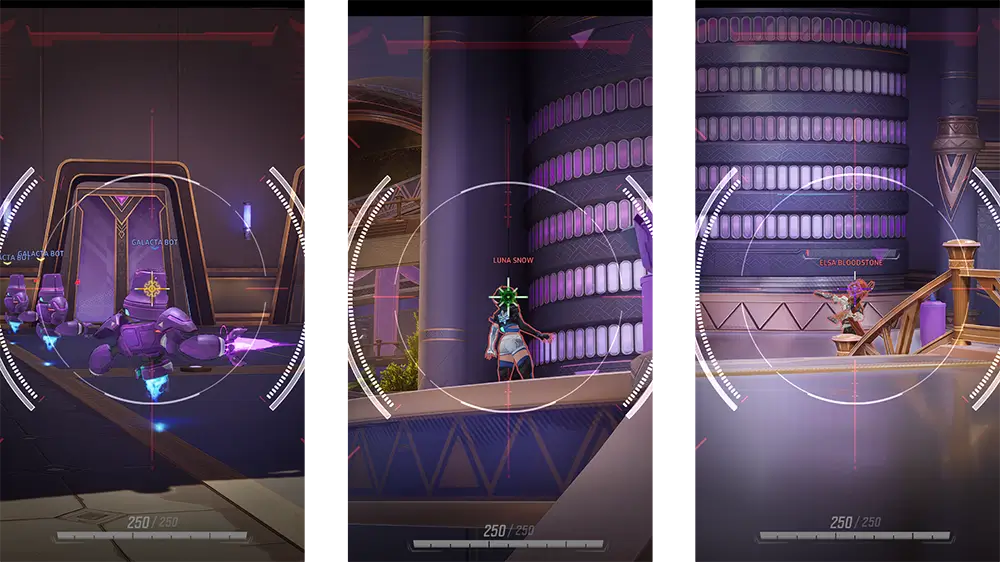
Does Marvel Rivals let you customize your crosshair?
Yes, and the built-in editor is more capable than a lot of players realize. Inside the settings you can change the color, opacity, thickness, and center gap of your reticle, and you can turn reticle animation on or off. You can save up to five presets and switch between them, and you can set a different crosshair for each hero or one crosshair for everyone.
For most people, the in-game editor is all you need. It is free, it is built for the game, and it carries zero risk. Start there.
How to change your crosshair in Marvel Rivals
Here is the built-in method. It takes about a minute.
Open the settings menu
Launch Marvel Rivals and open Settings from the main menu or the in-match pause menu.
Choose your input tab
Pick the Keyboard tab if you play on mouse and keyboard, or the Controller tab on a gamepad. The reticle options live in the HUD settings. Depending on your version they sit under a Combat or HUD heading, so scroll until you find Reticle Save.
Open Reticle Save and adjust
Tune the color, opacity, thickness, and center gap, and toggle reticle animation on or off. The preview updates as you go, so you see the change before you commit.
Save it as a preset
Store your design in one of your five preset slots. You can come back and switch presets any time.
Set it per hero (optional)
Use the hero filter at the top of the menu to give a specific hero its own reticle, or choose All Heroes to apply one crosshair everywhere.
Import a crosshair code
If you have seen a pro or a guide share a crosshair "code," you can paste it straight in. In the Reticle Save section, choose Import Save, paste the code, and confirm. One thing to note: importing codes is a PC feature. On PlayStation 5 and Xbox you cannot paste a code, so you recreate the look by hand with the sliders.
What makes a good Marvel Rivals crosshair
There is no single best crosshair, but a few ideas help you land on one that fits how you play:
- Match the gap to the hero. Precise, long-range heroes like Black Widow, Hawkeye, and Hela reward a small center gap or a single dot, so nothing hides a distant target.
- Go bigger for spray and projectiles. Heroes who lob or spray, like Squirrel Girl or Moon Knight, are easier to track with a slightly larger reticle.
- Pick a color that fights the map. Bright cyan, green, or pink usually stay visible against Marvel Rivals maps better than white, which can wash out on light ground.
- Keep it clean. A busy crosshair covers the exact pixels you are trying to shoot.
When a crosshair overlay makes sense
The built-in editor covers the basics well, so when would you reach for a separate overlay like Crosshair Overlay? A few cases:
- A shape or image the game does not offer. The in-game reticle sticks to lines, dots, and circles. An overlay lets you upload your own image or use shapes the game has no option for.
- Effects. Glow, spin, pulse, and animated designs are not part of the in-game editor.
- The same crosshair in every game. One overlay gives you a single, consistent point of aim across Marvel Rivals, Overwatch, and anything else you play, so you do not rebuild it per game.
- A bit of fun. Bind a meme image to a hotkey and flash it on screen for clips.
Crosshair Overlay is an Xbox Game Bar widget. You design the crosshair in its editor, pin the widget with Win + G, and it draws on top of your game. It does not inject code or read the game. It draws on your screen the same way the Discord or Xbox overlays do.
Is a crosshair overlay safe in Marvel Rivals?
Read this part carefully, because Marvel Rivals takes anti-cheat seriously. NetEase runs a multi-layered anti-cheat system, and it has publicly banned third-party tools that inject into the game or read its memory. The stats plugin Blitz is the well-known example: it hooked into the game process to surface hidden data, and NetEase labeled it cheating software.
A crosshair overlay is a different category. It does not read the game or inject anything. It only draws pixels on your screen. The built-in reticle, of course, is completely allowed and carries zero risk, so it is always the safe default, especially in Ranked.
For a Game Bar overlay like Crosshair Overlay, our own testing on Marvel Rivals came back clean, and it draws the same way system overlays do. That said, anti-cheat rules are set by NetEase, they can change at any time, and a few players have reported that unrelated overlays caused false positives. So the honest answer is this: use any third-party overlay at your own risk, follow the game's terms of service, and if you want zero risk, the in-game reticle editor already does a lot.
Sources
- Penalty Announcement: Zero Tolerance on Cheats, Marvel Rivals official site, May 2026
- Marvel Rivals crosshairs: how to change and import them, TechRadar
- Marvel Rivals bans top stats tool and warns against cheating software, Dot Esports
Marvel Rivals is a trademark of its respective owners. Crosshair Overlay is an independent product and is not affiliated with, endorsed by, or sponsored by NetEase or Marvel.
Marvel Rivals crosshair questions, answered
One crosshair, every game
Crosshair Overlay is a Game Bar widget that pins a clean, customizable crosshair over any PC game. Build shapes, colors, effects, even image crosshairs. One-time $2.99, no subscription.